
N-Gone Pro - 1 Click Asset Optimization for Blender v1.35
BBlK
09-Mar-24
0
Related Articles
OCD (One Click Damage) v2.0 Full (Blender)
On 26-Feb-24
by
OCD (One Click Damage) v2.0 Full (Blender) This ultimate...
OCD (One Click Damage) v2.0 Full (Blender) This ultimate...
Blendermarket – SimpleBake 5.1.2 and Grid Modeler v1.11.2 & v1.9.6
On 05-Jan-21
by
Blendermarket – SimpleBake 5.1.2 and Grid Modeler...
Blendermarket – SimpleBake 5.1.2 and Grid Modeler...
[UPDATED]Blender Addon SUPER-Solid-Mode V4.3.3
On 11-Jan-23
by
[UPDATED]Blender Addon SUPER-Solid-Mode V4.3.3...
[UPDATED]Blender Addon SUPER-Solid-Mode V4.3.3...
Gumroad – Group Pro v2.1.8
On 27-Feb-21
by
Gumroad – Group Pro v2.1.8 ========== Info: For Blender...
Gumroad – Group Pro v2.1.8 ========== Info: For Blender...
CGITrainer 0.9.3 for Max 2013 2014 x64 ONLY
On 25-May-16
by
CGITrainer 0.9.3 for Max 2013 2014 x64 ONLY Plugins | max...
CGITrainer 0.9.3 for Max 2013 2014 x64 ONLY Plugins | max...
N-Gone Pro - 1 Click Asset Optimization for Blender v1.35
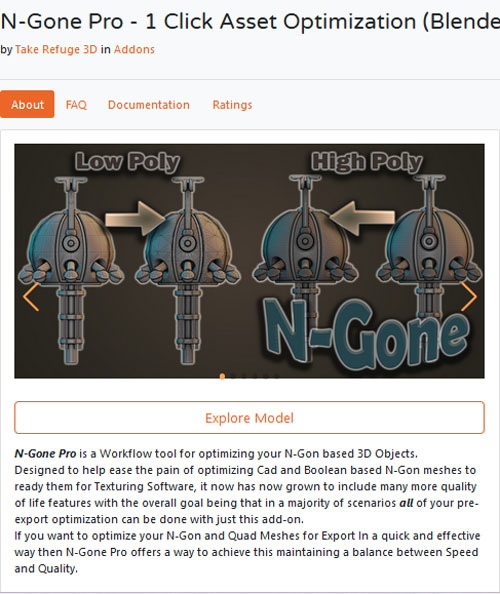
N-Gone Pro is a Workflow tool for optimizing your N-Gon based 3D Objects.
Designed to help ease the pain of optimizing Cad and Boolean based N-Gon meshes to ready them for Texturing Software, it now has now grown to include many more quality of life features with the overall goal being that in a majority of scenarios all of your pre-export optimization can be done with just this add-on.
If you want to optimize your N-Gon and Quad Meshes for Export In a quick and effective way then N-Gone Pro offers a way to achieve this maintaining a balance between Speed and Quality.
The Pro Version is the Ultimate version and allows for:
- Batch Creation of High and Low Poly Objects Optimized for Export in One Click
- Manage Naming Conventions for Texture Baking in other software In a single click (Substance, Marmoset Tool Bag, InstaMAT Studio)
- Batch Merge Vertices on all Selected Objects in Object Mode in One Click
- Batch Rotate All Selected Objects
- Smart UV Unwrap or Cube Project Selected Objects from within Object Mode.
- Edit Vertex Color Attribute on Multiple Selected Objects or Individual Faces with a single click
- Convert Color Attributes in one click with out having to dig through object properties
- Easy Remesh Panel ~ High Poly Optimizer for Sculpts and Photo Scans
The Pro Version Gives all the Tools and is regularly updated with new features and Improvements
Note: instead of installing normally by pointing out on the zip file, you need to extract the zip and from blender addon installation windows point it at the extracted python script
https://blendermarket.com/products/n-gone
Warning! You are not allowed to view this text.
DOWNLOAD
You must login to show this link. No account? Create Account Category: Other VendorsInformation
Users of Guests are not allowed to comment this publication.