
Udemy – Rigging for characters in Maya made easy in only 60 minutes
Admin2
10-Jul-21
0
Related Articles
Udemy - Character Rigging Crash Course In Maya For Intermediate User
On 29-Mar-23
by
Udemy - Character Rigging Crash Course In Maya For...
Udemy - Character Rigging Crash Course In Maya For...
Udemy - Game Character Rigging for Beginners in Maya
On 06-Jan-22
by
Udemy - Game Character Rigging for Beginners in Maya...
Udemy - Game Character Rigging for Beginners in Maya...
Rigging Human IK Characters for Mocap in Maya and Motion Builder 2016
On 25-May-16
by
Rigging Human IK Characters for Mocap in Maya and Motion...
Rigging Human IK Characters for Mocap in Maya and Motion...
![[Tutorials] Character Rigging in Maya](http://i.imgur.com/ZwOGZbf.jpg)
[Tutorials] Character Rigging in Maya
On 20-Jun-15
by
Character Rigging in Maya...
Character Rigging in Maya...

Udemy – 3D character rigging for animation in Cinema 4D Masterclass
On 14-Jun-20
by
Udemy – 3D character rigging for animation in Cinema 4D...
Udemy – 3D character rigging for animation in Cinema 4D...
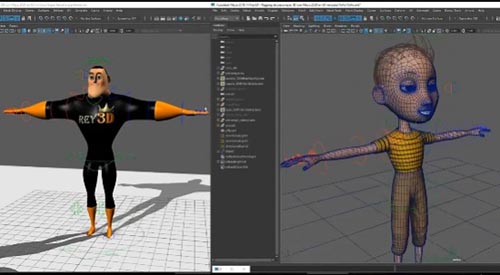
Udemy – Rigging for characters in Maya made easy in only 60 minutes
Duration 1h MP4
==========
Info:
What you’ll learn
At the end of the course, you will be able to create complete corporal rigs for animation in only 60 minutes.
Create and automate custom controls.
Achieve excellent deformations almost automatically without using plug ins.
Create and automate custom deformations with Pose Editor.
Bake deformations to export to other 3D software.
Use Autodesk Maya for Rigging.
Learn to create a complete corporal rig in about 60 minutes including the weighting process, save time and work as never, also create custom deformations with the new Pose Editor, create custom controllers to accelerate the animator work and get the most control over the character on hands and feet, also get tips to weight your character in a fast way.
Learn to bake the deformations created with Delta Mush, and this way export your character with same deformations in Maya to other 3D software as, Unreal Engine, Unity, or other 3D applications.
If you enjoyed our course Rigging for characters in Autodesk Maya (the one with the Hulk character), where we created same rig than this course but step by step, in this case you’ll create a similar rig but in an automatic way with some improvements as a hip joint, custom deformations and controllers, baking deformations, etcetera.
The process is simple, indicate Maya where the joints are, create the rig, modify the rig to add important features, customize and automate controllers, weight the character and finally add and bake deformations to accelerate this process.
DOWNLOAD HERE :
https://seekvn.com/file/b24ea8ce990fc44d016adcf428a9a0e0/UdemyRiggingforcharactersinMayamadeeasyinonly60minutes.part1.rar.html
https://seekvn.com/file/2bb1a5b6a0e961b524d74059def35630/UdemyRiggingforcharactersinMayamadeeasyinonly60minutes.part2.rar.html
https://seekvn.com/file/02424596a4db1df276b0fdb08afb9a2e/UdemyRiggingforcharactersinMayamadeeasyinonly60minutes.part3.rar.html
https://seekvn.com/file/c17436f30666b8e93b3f1532886c576e/UdemyRiggingforcharactersinMayamadeeasyinonly60minutes.part4.rar.html
DOWNLOAD
Direct Download
If link broken, comment under article, we will update it
Category: Tutorials
Information
Users of Guests are not allowed to comment this publication.