
Udemy – Animate a Rocket Launch Smoke & Fire Simulation in Blender
Admin2
10-Jul-21
0
Related Articles
Udemy – Mantaflow Fire & Smoke Simulation Guide in Blender
On 18-May-20
by
Udemy – Mantaflow Fire & Smoke Simulation Guide in...
Udemy – Mantaflow Fire & Smoke Simulation Guide in...
Udemy - Blender - Fire and Smoke Simulation Complete Guide
On 24-Apr-18
by
Udemy – Blender – Fire and Smoke Simulation Complete Guide...
Udemy – Blender – Fire and Smoke Simulation Complete Guide...
Udemy - Learn EmberGen: real-time VFX
On 07-May-23
by
Udemy - Learn EmberGen: real-time VFX...
Udemy - Learn EmberGen: real-time VFX...
Udemy – Make a Cinematic Jet Fighter Animation In Blender
On 27-Nov-23
by
Udemy – Make a Cinematic Jet Fighter Animation In Blender...
Udemy – Make a Cinematic Jet Fighter Animation In Blender...
Udemy - Real-time VFX in EmberGen and Unreal Engine 5
On 28-May-23
by
Udemy - Real-time VFX in EmberGen and Unreal Engine 5...
Udemy - Real-time VFX in EmberGen and Unreal Engine 5...
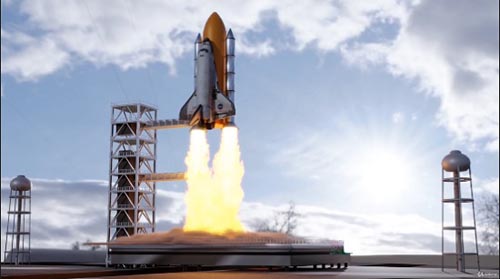
Udemy – Animate a Rocket Launch Smoke & Fire Simulation in Blender
Duration 1h 30m MP4
==========
Info:
Create a Short film Animation of a Rocket Launch.
What you’ll learn
– Learn Smoke and Fire Simulation in Blender
– Learn Modeling Techniques by Creating a Space Station
We will learn modeling:
– Section 1: Modeling
We will learn to model a space station, starting by the base. Adding the supporting column on the left side. Then we will import the Rocket and put it in place
– Section 2: Texturing
We will create different shaders: Metal and assign them to our space station
We will fix the “Blury” smoke by create a specific shader for the smoke to make it look high quality
– Section 3: Fluid Simulation
We will Make Fire & Smoke, then we will add forces to affect our fire & smoke
– Section 4: Animation
We will animate our spaceship going up to the space. We will use the graph editor to control the speed of our rocket
– Section 5: Lighting
We will experiment with the new HDRI map in blender 2.9, changing the altitude to have the space effect
– Section 6: Rendering
After Baking our smoke & fire simulation & animating our rocket going up with the camera pointing to it. We will render our Animation and Achieve our final result
Requirements
– Have Blender Downloaded in your Computer
– Have a Decent GPU that can handle the Fluid Baking
Who this course is for:
– 3D Designers who want to Learn Blender
– Animators who want to improve their 3D skills
DOWNLOAD HERE :
https://seekvn.com/file/10863d8ed96e232d172984b4007552bd/UdemyAnimateaRocketLaunchSmokeFireSimulationinBlender.part1.rar.html
https://seekvn.com/file/37e5b68bad63967cd8fd7280c8f23f95/UdemyAnimateaRocketLaunchSmokeFireSimulationinBlender.part2.rar.html
https://seekvn.com/file/8fc33b335ec975a0528fd111ff8642cf/UdemyAnimateaRocketLaunchSmokeFireSimulationinBlender.part3.rar.html
https://seekvn.com/file/dd79d35f5a6982065494f0d51600a2db/UdemyAnimateaRocketLaunchSmokeFireSimulationinBlender.part4.rar.html
DOWNLOAD
You must login to show this link. No account? Create Account Category: TutorialsInformation
Users of Guests are not allowed to comment this publication.