
CreativeLive – Editing 360 Degree Photos in Photoshop & After Effects
Admin2
08-Jun-21
0
Related Articles
Skillshare - Retouching VR Images (360 Photos) with Photoshop and After Effects
On 14-Jan-19
by
Skillshare – Retouching VR Images (360 Photos) with...
Skillshare – Retouching VR Images (360 Photos) with...
Lynda - Editing a Spherical Panorama with Photoshop and After Effects
On 13-Dec-17
by
Lynda – Editing a Spherical Panorama with Photoshop and...
Lynda – Editing a Spherical Panorama with Photoshop and...
Udemy – Adobe Photoshop CC for Photo Editing and Image Retouching
On 02-Feb-24
by
Udemy – Adobe Photoshop CC for Photo Editing and Image...
Udemy – Adobe Photoshop CC for Photo Editing and Image...
CreativeLive - 360 Photo Editing in Photoshop
On 07-Apr-19
by
CreativeLive – 360 Photo Editing in Photoshop...
CreativeLive – 360 Photo Editing in Photoshop...
Photoshop Portrait Retouching Masterclass - Learn Photoshop
On 28-May-16
by
Photoshop Portrait Retouching Masterclass - Learn...
Photoshop Portrait Retouching Masterclass - Learn...
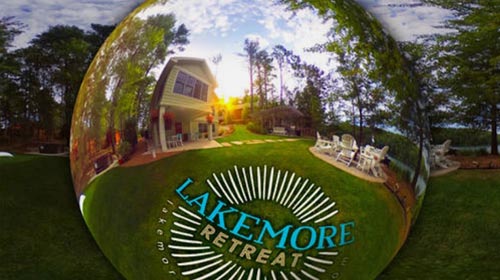
CreativeLive – Editing 360 Degree Photos in Photoshop & After Effects
Duration 43m Project Files Included MP4
==========
Info:
Class Description
Learn how to mask out gear, composite, and retouch your 360Вє images
AFTER THIS CLASS YOU’LL BE ABLE TO:
Get a brief introduction to After Effects (from a Photoshop perspective)
Work non-destructively with linked layered Photoshop files
Seamlessly remove elements from a 360Вє photo
Create adjustments without causing a �seam’ in the final composite
Introduce 2D artwork (including logos) without distortion
Add special effects including a sunrise and sky replacement
ABOUT CHRIS’ CLASS:
As 360º photos continue to grow in popularity, especially in social media and hospitality industries, the next logical step is to begin editing and enhancing these images just as you do with traditional photography. The challenge is, however, that these are not flat images. As images are “unwrapped” in photo editing tools, we need to use alternate workflows for editing and compositing these types of photos.
This course will show you a step-by-step, non-destructive process, for masking out your tripod, applying 2-dimensional artwork, retouching, and color adjustments, as well as adding special effects to your image.
WHO THIS CLASS IS FOR:
Photographers
Graphic Designers
Web Designers
Interaction Designers
VR Designers
SOFTWARE USED:
Adobe Photoshop CC 2021
Adobe After Effects CC 2021
Ricoh Theta App (optional):
DOWNLOAD HERE :
https://seekvn.com/file/ca197d4d03553a407b92debeee905ef9/CreativeLiveEditing360DegreePhotosinPhotoshopAfterEffects.part1.rar.html
https://seekvn.com/file/935eea48ec6bbfbdb32caa2cf82994d4/CreativeLiveEditing360DegreePhotosinPhotoshopAfterEffects.part2.rar.html
https://seekvn.com/file/ca9d26307584f71cf01c9a19286fcbdb/CreativeLiveEditing360DegreePhotosinPhotoshopAfterEffects.part3.rar.html
https://seekvn.com/file/9dc9cbc9ac5bcfae96085b23b0438207/CreativeLiveEditing360DegreePhotosinPhotoshopAfterEffects.part4.rar.html
DOWNLOAD
You must login to show this link. No account? Create Account Category: TutorialsInformation
Users of Guests are not allowed to comment this publication.