
Gumroad – Intro to ship design + Moi3D basics
cod2war
31-Aug-20
0
Related Articles
Hendrix-Design – Intro To Octance for Blender
On 02-Apr-21
by
Hendrix-Design – Intro To Octance for Blender ==========...
Hendrix-Design – Intro To Octance for Blender ==========...
Udemy - Cinematic look with Blender 3.0 - 8+ hours MASTER tutorial
On 25-Feb-22
by
Udemy - Cinematic look with Blender 3.0 - 8+ hours MASTER...
Udemy - Cinematic look with Blender 3.0 - 8+ hours MASTER...
Udemy - Blender Basics: A Quick Intro to 3D Modeling and Rendering
On 25-Apr-23
by
Udemy - Blender Basics: A Quick Intro to 3D Modeling and...
Udemy - Blender Basics: A Quick Intro to 3D Modeling and...
Udemy – Blender 4.0 Beginner Workflow For Cinematic Art – Step-By-S.
On 28-Dec-23
by
Udemy – Blender 4.0 Beginner Workflow For Cinematic Art –...
Udemy – Blender 4.0 Beginner Workflow For Cinematic Art –...
Gumroad - Moi 3D Basic Tutorials by Bojan Koturanovic
On 02-Jan-19
by
Gumroad – Moi 3D Basic Tutorials by Bojan Koturanovic...
Gumroad – Moi 3D Basic Tutorials by Bojan Koturanovic...
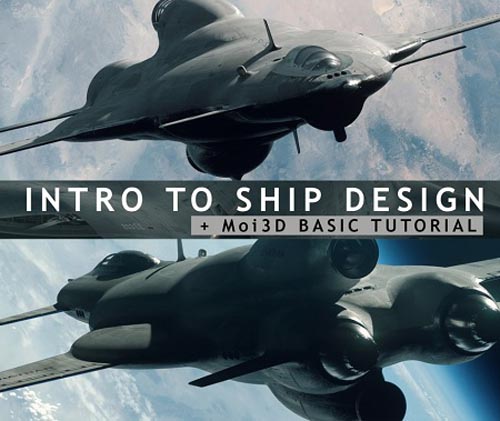
Gumroad – Intro to ship design + Moi3D basics
Duration 5h Project Files Included MP4
==========
Info:
In this tutorial I will show you the basics of Moi3D and how to create a ship from start to finish, using Moi3D, Blender, Octane render and Photoshop.
The tutorial is accessible to everyone. I will guide you through the process of designing your spaceship going from very simple shapes to a more complex and finished design, all in a matter of just a few hours.
If you are a Blender user like me, you will see that it shares many similar shortcuts with Moi3D, which I found to be very convenient.
If you don’t have Octane, no problem! You can get the same result with any other good rendering engine.
What you get:
• 5 hours of narrated videos (normal speed)
• PART I: Covers Moi3D basics and all my tips & shortcuts: 1 hour
• PART II: Ship demo, covers all the steps to designing a ship in Moi3D: 3h20
• PART III: Kitbashing in blender, setting-up the scene in Octane Render, Final touch-ups in Photoshop: 1 hour.
• My shortcuts (allow you to be faster, Blender friendly)
• Textures used, Renders, JPGs, PSDs, Blender scenes, OBJs, Octane scene.
• Kitbash set: 1x jet engine, 1x space engine, 1x cockpit, 1x small prop, .OBJ, .BLEND
Why use Moi3D?
It is a CAD modeling tool, meaning there is no limit to detail.
It is very fast and efficient, and you can create shortcuts for almost every action.
The export system (.OBJ, .FBX etc…) is very powerful, and allows you to control the density of the geometry from very low to very high poly, and oh, it exports very cool UV automatically as well !
One of my favorite tools by far, I hope you find it as useful as I do!
Update 2020_06_17:
Shortcuts added
DOWNLOAD HERE :
http://seekvn.com/file/f2baa9be2dfdb40fa0fd9613b000ddc7/GumroadIntrotoshipdesignMoi3Dbasics.part1.rar.html
http://seekvn.com/file/ff8f20929d95365c58fe0fcea9cfb735/GumroadIntrotoshipdesignMoi3Dbasics.part2.rar.html
http://seekvn.com/file/f7524a83cdeffdb2fe270fd4dff88d15/GumroadIntrotoshipdesignMoi3Dbasics.part3.rar.html
http://seekvn.com/file/5611767deab94523721b96241f7b4da0/GumroadIntrotoshipdesignMoi3Dbasics.part4.rar.html
http://seekvn.com/file/6c4892db22026cca96a0bdfc15ebbdba/GumroadIntrotoshipdesignMoi3Dbasics.part5.rar.html
http://seekvn.com/file/1760697f0c3fb6db097e6a8bdcca521c/GumroadIntrotoshipdesignMoi3Dbasics.part6.rar.html
http://seekvn.com/file/bab4a4cc4b07681ce91d1d7591eeb376/GumroadIntrotoshipdesignMoi3Dbasics.part7.rar.html
DOWNLOAD
You must login to show this link. No account? Create Account Category: TutorialsInformation
Users of Guests are not allowed to comment this publication.