
Udemy - Blender 3.0 Vintage Car Creation by Darrin Lile
cod2war
27-Mar-22
0
Related Articles
Packt Publishing - Learn Animation Production with Blender
On 05-Aug-19
by
Packt Publishing – Learn Animation Production with Blender...
Packt Publishing – Learn Animation Production with Blender...
Udemy - Create Captain America's Motorcycle with Blender
On 19-Aug-22
by
Udemy - Create Captain America's Motorcycle with...
Udemy - Create Captain America's Motorcycle with...
Udemy - Blender Strategies for Modeling and Texturing
On 28-Jan-23
by
Udemy - Blender Strategies for Modeling and Texturing...
Udemy - Blender Strategies for Modeling and Texturing...

Udemy – Blender Subway Interior Modeling
On 22-Jul-24
by
Udemy – Blender Subway Interior Modeling Duration 4h 13m...
Udemy – Blender Subway Interior Modeling Duration 4h 13m...
Udemy - 3D Logo Creation: Fundamentals and Beyond In Blender
On 03-Apr-23
by
Udemy - 3D Logo Creation: Fundamentals and Beyond In...
Udemy - 3D Logo Creation: Fundamentals and Beyond In...
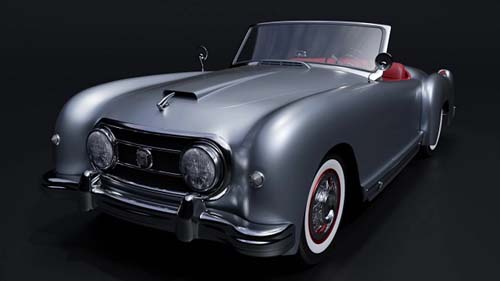
Udemy - Blender 3.0 Vintage Car Creation by Darrin Lile
Duration 18h 30m Project Files Included MP4
DOWNLOAD
Udemy - Blender 3.0 Vintage Car Creation by Darrin Lile
Duration 18h 30m Project Files Included MP4
Info:
In this course we will create a 1952 Nash-Healey Roadster. This is a rare gem of a car; only about 500 were ever made. But we're going to create one using Blender 3.0, from the first polygon to the final rendered animation. If you've ever wanted to create realistic, detailed models of complex objects, then this course is for you. Not only will you learn modeling tools and techniques, but you will also learn how to use reference images, stay organized, and manage a large project in Blender.
We will begin with the body of the car, creating the underlying shape. And then, using Blender's Shrink Wrap modifier, we will mold each panel to that shape, so we get a precise fit between each of the pieces. Next we will work on modeling the various external parts of the car. We will create the chrome details using Blender's Subdivision Surface modifier. And we will create the tire treads and spoked hubcaps using the Array Modifier. We will then model the various pieces of the car's interior, keeping an eye on our reference images to bring the details to life.
When the modeling is complete, we will create materials and textures for the car, using Blender's Node Editor. And finally, we will light and render the scene using the Cycles render engine. We'll also have some fun animating the camera around the car and create a short video using Blender's Video Sequence Editor.
Learn fundamental Blender tools and techniques while creating this rare classic car, with "Blender 3.0 Vintage Car Creation."
DOWNLOAD HERE :
https://seekvn.com/file/cdb2df24156ba878f329185354d6a393/UdemyBlender3.0VintageCarCreation.part01.rar.html
https://seekvn.com/file/a0a7a310160c0bd855144bd021003639/UdemyBlender3.0VintageCarCreation.part02.rar.html
https://seekvn.com/file/dd249d064f9dd8b6d27a2a6060c36b65/UdemyBlender3.0VintageCarCreation.part03.rar.html
https://seekvn.com/file/ef7ef947348728df5cfcec597a9f5fcf/UdemyBlender3.0VintageCarCreation.part04.rar.html
https://seekvn.com/file/f33da380da12c05c9ae5b9262ab2876f/UdemyBlender3.0VintageCarCreation.part05.rar.html
https://seekvn.com/file/fe04353d4d1b5c9eefbf6ae690a37639/UdemyBlender3.0VintageCarCreation.part06.rar.html
https://seekvn.com/file/3e132e678120a51056173260a70792ff/UdemyBlender3.0VintageCarCreation.part07.rar.html
https://seekvn.com/file/6238b631e956f6942646f202c55f55ab/UdemyBlender3.0VintageCarCreation.part08.rar.html

If link broken, comment under article, we will update it
Category: Tutorials
Information
Users of Guests are not allowed to comment this publication.