
The Gnomon Workshop - Preparing ZBrush Models for 3D Printing with Maarten Verhoeven
cod2war
15-Mar-22
0
Related Articles

The Gnomon Workshop - The Making of "Red Myst" with Maarten Verhoeven
On 26-Jul-22
by
The Gnomon Workshop - The Making of "Red Myst"...
The Gnomon Workshop - The Making of "Red Myst"...

The Gnomon Workshop - Sculpting a Dragon with ZBrush
On 24-Feb-15
by
The Gnomon Workshop – Sculpting a Dragon with ZBrush...
The Gnomon Workshop – Sculpting a Dragon with ZBrush...
[Tutorials] The Gnomon Workshop - Sculpting a Dragon with ZBrush
On 10-Feb-15
by
The Gnomon Workshop – Sculpting a Dragon with ZBrush...
The Gnomon Workshop – Sculpting a Dragon with ZBrush...

The Gnomon Workshop – Introduction To Zbrush 2021
On 08-Apr-21
by
The Gnomon Workshop – Introduction To Zbrush 2021...
The Gnomon Workshop – Introduction To Zbrush 2021...

The Gnomon Workshop – Introduction To Zbrush 2021
On 13-Apr-21
by
The Gnomon Workshop – Introduction To Zbrush 2021...
The Gnomon Workshop – Introduction To Zbrush 2021...
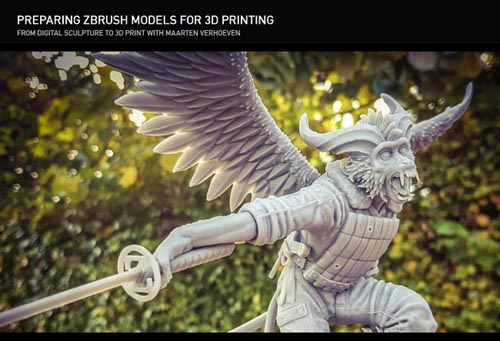
The Gnomon Workshop - Preparing ZBrush Models for 3D Printing with Maarten Verhoeven
Duration 3h 6m Project Files Included MP4
DOWNLOAD
The Gnomon Workshop - Preparing ZBrush Models for 3D Printing with Maarten Verhoeven
Duration 3h 6m Project Files Included MP4
Info:
Discover how to efficiently translate your CG models into physical objects with this detailed ZBrush workshop by Maarten Verhoeven. Taking you through the entire workflow, from digital sculpture to 3D print, Maarten walks through how to break down a ZBrush model to prepare it for your 3D printer and discusses all the important steps to help you successfully prepare your models for printing. The workshop covers the technical processes involved in keying, scaling, and hollowing, as well as setting up drain holes and how to set everything up on a print bed.
By completing this workshop, you will develop a firm grasp of what is needed to take a ZBrush model into the physical realm. You'll learn how to create hollowed-out, keyed, and watertight meshes, and understand how to take advantage of tools like Meshmixer and PreForm to successfully engineer models for 3D printing - in particular for resin printers.
Due to the technical nature of this workshop and the processes covered, this tutorial is recommended for intermediate and advanced digital artists with previous experience using ZBrush.
Maarten's Key brushes are included as a downloadable resource with this workshop.
SOFTWARE USED
MeshMixer ZBrush PreForm
DOWNLOAD HERE :
https://seekvn.com/file/3185205a002024dca4513a549429897b/TheGnomonWorkshopPreparingZBrushModelsfor3DPrinting.part1.rar.html
https://seekvn.com/file/5f3b161df1f44c21653fe1d37638d984/TheGnomonWorkshopPreparingZBrushModelsfor3DPrinting.part2.rar.html
https://seekvn.com/file/5fb5b1aacdd667289bacacf084a14fdc/TheGnomonWorkshopPreparingZBrushModelsfor3DPrinting.part3.rar.html
https://seekvn.com/file/dc7c3f60d8f579fccdd56c59f7d336d8/TheGnomonWorkshopPreparingZBrushModelsfor3DPrinting.part4.rar.html

If link broken, comment under article, we will update it
Category: Tutorials
Related Articles
The Gnomon Workshop - The Making of "Red Myst" with Maarten Verhoeven
On 26-Jul-22
by
The Gnomon Workshop - The Making of "Red Myst"...
The Gnomon Workshop - The Making of "Red Myst"...
The Gnomon Workshop - Sculpting a Dragon with ZBrush
On 24-Feb-15
by
The Gnomon Workshop – Sculpting a Dragon with ZBrush...
The Gnomon Workshop – Sculpting a Dragon with ZBrush...
[Tutorials] The Gnomon Workshop - Sculpting a Dragon with ZBrush
On 10-Feb-15
by
The Gnomon Workshop – Sculpting a Dragon with ZBrush...
The Gnomon Workshop – Sculpting a Dragon with ZBrush...
The Gnomon Workshop – Introduction To Zbrush 2021
On 08-Apr-21
by
The Gnomon Workshop – Introduction To Zbrush 2021...
The Gnomon Workshop – Introduction To Zbrush 2021...
The Gnomon Workshop – Introduction To Zbrush 2021
On 13-Apr-21
by
The Gnomon Workshop – Introduction To Zbrush 2021...
The Gnomon Workshop – Introduction To Zbrush 2021...
Information
Users of Guests are not allowed to comment this publication.