
UVPackmaster v2.5.3 for 3ds Max 2019 - 2022 Win x64
cod2war
06-Jan-22
0
Related Articles
FG Packing Warehouse Bundle
On 04-Sep-25
by
FG Packing Warehouse Bundle This bundle is a large...
FG Packing Warehouse Bundle This bundle is a large...
Rizom-Lab RizomUV Virtual Spaces 2022.0.11 Win
On 16-Dec-21
by
Rizom-Lab RizomUV Virtual Spaces 2022.0.11 Win...
Rizom-Lab RizomUV Virtual Spaces 2022.0.11 Win...

3D cardboard boxes and packing collection illustrations
On 10-Jun-19
by
3D cardboard boxes and packing collection illustrations 10...
3D cardboard boxes and packing collection illustrations 10...

PolySnow+ v1.01 and PolyCloth v2.02 for 3ds max 2016-2022
On 04-May-21
by
PolySnow+ v1.01 and PolyCloth v2.02 for 3ds max 2016-2022...
PolySnow+ v1.01 and PolyCloth v2.02 for 3ds max 2016-2022...

Stock pack can Retro Canned Food vector, Product Packing vectors 3
On 20-Jul-15
by
Stock pack can Retro Canned Food vector, Product Packing...
Stock pack can Retro Canned Food vector, Product Packing...
UVPackmaster v2.5.3 for 3ds Max 2019 - 2022 Win x64
DOWNLOAD
UVPackmaster v2.5.3 for 3ds Max 2019 - 2022 Win x64
Info:
UVPackmaster 2 is an efficient and fully-featured UV packing engine available also as a plugin for 3ds Max. Its robustness comes not only from the fact that it was written in C++ and runs as a multi-threaded application - it also provides a packing algorithm for Cuda-enabled GPUs (what gives a significant boost). In fact, it can perform some packing operations on all devices simultaneously: CPU and all GPUs in the system.
Features
UVPackmaster in 3ds Max is implemented as modifier - in order to pack a UV map the user needs to add the UVP modifier to the object modifier stack, select appropriate packing options (or load the options from a preset file) and press the Pack button. The UVP engine will pack the UV map and render the result to the user in a separate window. After the user closes the window, the modifier will remember the packing result in its own structure and it will apply it the original UV map every time it is instructed by 3ds Max to modify the object. The user can press the Pack button multiple times, changing the options according to their needs. Every time the button is pressed, the previous packing result is discarded and the original UV map is packed once again using a new set of the packing parameters. In order to apply the packed UV map to the object permanently, the user simply needs to collapse the UVP modifier.
The plugin for 3ds Max provides all core features of UVPackmaster engine PRO edition:
efficient UV packing algorithm
UV islands area measurement
overlapping UV islands detection
heuristic search algorithm
packing for a non-square texture
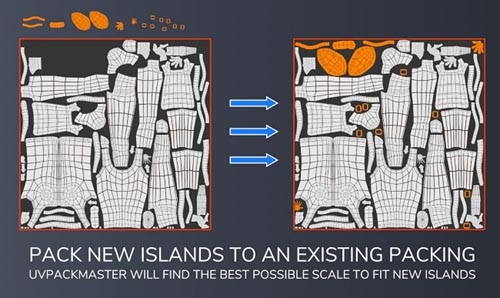
add new UV islands into an existing packing
accurate pixel margin calculation
overlapping UV islands lock
grouping UV islands
UDIM support
advanced heuristic algorithm
packing on GPU
heuristic search on all devices simultaneously (CPU and all GPUs)

If link broken, comment under article, we will update it
Category: Tutorials
Information
Users of Guests are not allowed to comment this publication.