
theBeeBee - slipped and take off clothes for GF8 / GF8.1
BBlK
02-Dec-24
2
Related Articles
DMC S-Top for GF8 and GF8.1
On 19-Dec-24
by
DMC S-Top for GF8 and GF8.1 Detail link: DMC - Dforce...
DMC S-Top for GF8 and GF8.1 Detail link: DMC - Dforce...
DMC T-Shirt for GF8 and GF8.1
On 02-Mar-24
by
DMC T-Shirt for GF8 and GF8.1 Detail link: DMC - Dforce...
DMC T-Shirt for GF8 and GF8.1 Detail link: DMC - Dforce...
DMC H-Pants for GF8 and GF8.1
On 20-Mar-24
by
DMC H-Pants for GF8 and GF8.1 Detail link: DMC - Dforce...
DMC H-Pants for GF8 and GF8.1 Detail link: DMC - Dforce...
DMC Bandeau Top for GF8 and GF8.1
On 12-Nov-23
by
DMC Bandeau Top for GF8 and GF8.1 Detail link: DMC Bandeau...
DMC Bandeau Top for GF8 and GF8.1 Detail link: DMC Bandeau...
Aya GooCals - gooey facial decals
On 27-Feb-24
by
Aya GooCals - gooey facial decals Detail link: GooCals -...
Aya GooCals - gooey facial decals Detail link: GooCals -...
theBeeBee - slipped and take off clothes for GF8 / GF8.1
Detail link: https://www.renderotica.com/store/sku/67889_theBeeBee-slipped-and-take-off-clothes-for-GF8-GF8-1
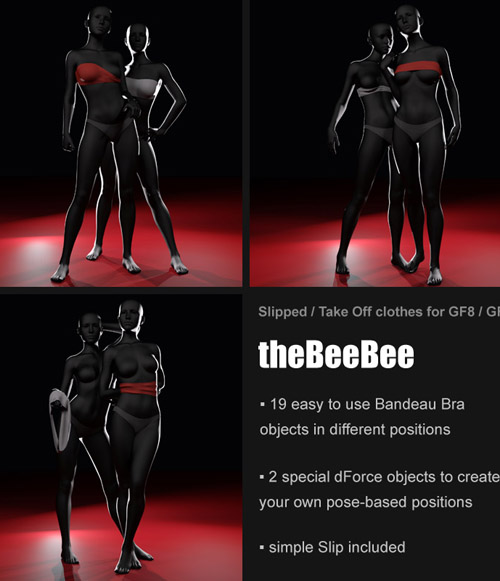
Do you know the worst thing about most 3D bras? They know only 2 states: present ... and not present. With the blink of an eye - or the change of the image - they suddenly disappear. Well ....
"theBeeBee" closes this gap: Numerous easy-to-use Bra objects in different positions give you the possibility to create a variety of scenes. And with the included dForce objects, morphs and some time and patience, you can not only create your own positions, but also realize scenes that were hardly possible before, such as hands under the bra.
The package contains:
* 19 easy to use Bandeau Bras in different positions
* 2 special dForce objects to create your own pose-based slipped or take off Bandeau Bra positions
* 12 Surface Materials aka "Colors" (Iray only!)
* 6 Simulation Behavior presets for the dForce objects
* 6 QS3 (Quick Start Simulation Setup) to learn how to use the dForce objects
* some Simulation helper (scripts and one object)
* 1 simple Slip as free addition
The installation can be done with DIM or manually and is explained with screenshots in the online manual.
How to open the online manual:
Visit my renderotica profile https://www.renderotica.com/artists/pushee-ri.aspx
open my website, scroll down to the "Manuals" section and click on the online manual you want.
Warning! You are not allowed to view this text.
DOWNLOAD
You must login to show this link. No account? Create Account Category: AdultsComments (2)
Information
Users of Guests are not allowed to comment this publication.