
Exnem dForce Action Girl 3 for Genesis 8 Female
This Package contains the ¨Police Girl" meshes for...
This package contains the “Sexy Nurse” meshes for DAZ...
This Package contains the "Vampiress" meshes for...
Exnem dForce Wrestler Outfit for Genesis 8 Female Detail...
Exnem dForce Pirate Outfit for Genesis 8 Female Detail...
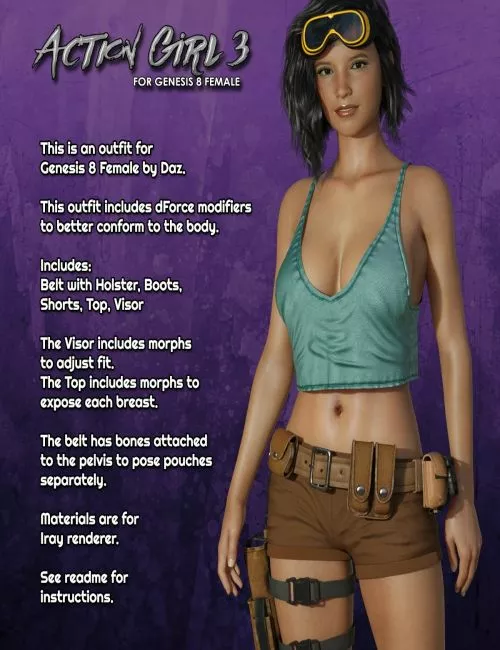
Action Girl 3 Outfit for Genesis 8 Female (DAZ Studio & Iray)
This package includes the stylish “Action Girl 3” outfit set designed for Genesis 8 Female. Built with dForce modifiers, the clothing naturally drapes and conforms to the body, making it perfect for dynamic poses and realistic renders in Iray.
What’s Included
• AG3 Belt
• AG3 Boots
• AG3 Shorts
• AG3 Top
• AG3 Visor
Each item loads separately, allowing you to mix and match with other outfits or use only the parts you need.
Features
• dForce enabled outfit for realistic cloth simulation
• Top includes morphs to expose the breasts
• Visor includes morphs for fit adjustment and ON/OFF options
• Belt includes bones attached to pelvis for posing pouches independently
• 2 Iray Material Sets included
• Texture templates included for custom designs
System Requirements
• DAZ Studio 4.10 or higher
Ownership
• All content created by Exnem
Required Base Figure
• Genesis 8 Female
Installation Instructions
• Extract the .zip file using your unzip software
• Click “Extract To” and select your DAZ Studio library folder (e.g. C:\Users\Public\Documents\My DAZ 3D Library)
• Ensure “Use folder paths” or similar option is enabled to preserve correct directory structure
Usage Tips
• Load Genesis 8 Female into your scene (can be pre-morphed)
• Double-click to load each outfit piece while the figure is selected
• Apply materials from the Materials folder
• Run dForce simulation at your pose frame and allow an extra 30–60 frames for proper settling
Detail: https://www.renderosity.com/marketplace/products/171212
DOWNLOAD HERE: