
Am Construction Site
BBlK
09-Oct-25
0
Related Articles
Adventure Village Construction Set 1 (Reallusion)
On 23-Nov-23
by
Adventure Village Construction Set 1 (Reallusion)...
Adventure Village Construction Set 1 (Reallusion)...
Warehouse Construction Set
On 13-Nov-23
by
Warehouse Construction Set Detail link: Build your own...
Warehouse Construction Set Detail link: Build your own...
Chic Restaurant (Poser, Vue & OBJ)
On 09-Jan-24
by
Chic Restaurant (Poser, Vue & OBJ) Detail link: This...
Chic Restaurant (Poser, Vue & OBJ) Detail link: This...
Chief Architect Premier X7 17.3.2.2 Win - Plugins
On 19-Nov-15
by
Chief Architect Premier X7 17.3.2.2 Win...
Chief Architect Premier X7 17.3.2.2 Win...
Moon Base for Poser
On 23-Jul-24
by
Moon Base for Poser Detail link: Moon Base is a high tech...
Moon Base for Poser Detail link: Moon Base is a high tech...
Am Construction Site
Detail link: https://www.renderosity.com/marketplace/products/88765
Am Construction Site
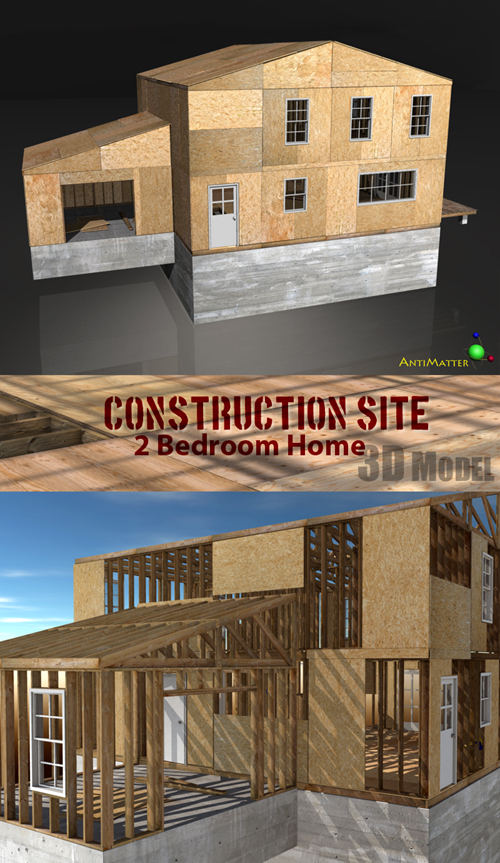
28 Smart Props (37 total Objects):
All the props combine to create a detailed 2 bedroom house Under Construction.
Complete with exposed stud walls, plywood sub-floors, a full basement, exposed electrical work, and more.
They can be loaded all together, or in dozens of combinations, to show the different stages of construction.
Create a variety of realistic scenes to show your 3d characters hard at work.
Fully Functioning windows and Doors:
9 windows with Open/Close Morphs
2 Bay windows
5 Doors with simple Open rotation dials
Photo realistic texture maps and Bump maps for all the wood and concrete.
The windows, doors and electrical work use simple shader sets:
Windows - glass and wood.
Doors - glass, wood and door knobs.
Electrical - wires, boxes, copper, caps,plugs, plates
A Dummy Figure is included to help load .pz2 materials in Poser.
Poser requires at least one figure loaded in a scene or it will not apply Mat poses to props.
The Dummy Figure is a small, transparent, lowpoly box saved as a Figure, just to make this easier.
There are also .mc6 versions of all materials, for Poser users who prefer to use those.
Templates are included for the studs, plywood, stairs, concrete, lights, decking, breaker box and drain.
The stud walls and Plywood use repeating textures to prevent the need for a HUGE set of maps.
However, each piece of lumber is grouped individually. With a basic understanding of the grouping tool,
it would be easy to create a different texture for each stud, or each sheet of plywood.
Warning! You are not allowed to view this text.
DOWNLOAD:You must login to show this link. No account? Create Account Category: Renderosity
Information
Users of Guests are not allowed to comment this publication.