
Avenger Bridge for DAZ Studio
BBlK
18-May-24
0
Related Articles
Nova Bridge for DAZ Studio
On 26-Jul-24
by
Nova Bridge for DAZ Studio Detail link: The bridge room...
Nova Bridge for DAZ Studio Detail link: The bridge room...
Starship Bridge XT 2 for DAZ Studio
On 04-Apr-24
by
Starship Bridge XT 2 for DAZ Studio Detail link: Product...
Starship Bridge XT 2 for DAZ Studio Detail link: Product...
Imperial Frigate Bridge for DAZ Studio
On 31-Dec-24
by
Imperial Frigate Bridge for DAZ Studio Detail link: The...
Imperial Frigate Bridge for DAZ Studio Detail link: The...
Detention Cells for DAZ Studio
On 01-Feb-25
by
Detention Cells for DAZ Studio Detail link: Your...
Detention Cells for DAZ Studio Detail link: Your...
Astrometrics Lab (for DAZ Studio)
On 30-Mar-24
by
Astrometrics Lab (for DAZ Studio) Analyze the galaxy in...
Astrometrics Lab (for DAZ Studio) Analyze the galaxy in...
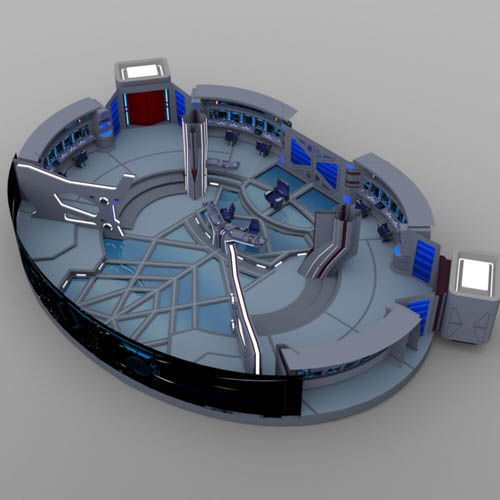
Avenger Bridge for DAZ Studio
Detail link: https://www.renderosity.com/marketplace/products/139414/avenger-bridge-for-daz-studio
The bridge was designed as an extension of the Bridge XI layout, but with more advanced features.
This version includes an below-lit glass floor, physical control buttons (including flight sticks), and a holographic display for the main viewscreen.
Two sets of doors at the rear of the bridge lead to elevator lifts.
Product Features:
* DAZ Studio prop: dsf, duf/ png, with 198,134 polygons.
* Highly-detailed control surfaces with modelled dials, levels, and buttons.
* All of the chairs are separate parts which can be rotated or repositioned in the scene.
* The captain's chair can not rotate.
* The left and right stand-up stations can be hidden or shown to further customize your scene.
* The left and right columns can also be hidden or shown.
* All of the walls can be hidden or shown to suit the needs of your scene.
* The left and right rear doors can open and close with Pose Controls dials on the Body.
- The lift interiors can be seen when the doors are opened.
Textures:
* Multiple "Light" materials for more customization.
* One texture scheme with texture, bump, and transparency maps.
* All of the materials use Iray shaders.
Hide/ Show Presets:
* Hide/ show each wall, the columns, and the ceiling.
- Hiding and showing the rear alcoves hides and shows the corresponding doors.
Cameras:
* Twenty camera files are included.
* The cameras have been positioned so no walls will block the camera.
All sales images rendered in DAZ Studio with an HDRI skydome environment.
Designed for use in DAZ Studio 4.9 and above with Iray. Not recommended for use in other software programs.
Warning! You are not allowed to view this text.
DOWNLOAD
You must login to show this link. No account? Create Account Category: RenderosityInformation
Users of Guests are not allowed to comment this publication.