
Exnem Dryad Outfit for Genesis 8 Female
BBlK
10-May-24
0
Related Articles
Exnem Playful Bunny Outfit for Genesis 8 Female
On 25-Oct-24
by
Exnem Playful Bunny Outfit for Genesis 8 Female Detail...
Exnem Playful Bunny Outfit for Genesis 8 Female Detail...
Exnem Sin City 1 Outfit for G8 Female
On 02-Apr-24
by
Exnem Sin City 1 Outfit for G8 Female Detail link: This...
Exnem Sin City 1 Outfit for G8 Female Detail link: This...
Exnem Summoner for G8 Female
On 20-Mar-25
by
Exnem Summoner for G8 Female Detail link: This is a very...
Exnem Summoner for G8 Female Detail link: This is a very...
Exnem dForce Pirate Outfit for Genesis 8 Female
On 25-Oct-24
by
Exnem dForce Pirate Outfit for Genesis 8 Female Detail...
Exnem dForce Pirate Outfit for Genesis 8 Female Detail...
Exnem dForce Wrestler Outfit for Genesis 8 Female
On 17-Apr-25
by
Exnem dForce Wrestler Outfit for Genesis 8 Female Detail...
Exnem dForce Wrestler Outfit for Genesis 8 Female Detail...
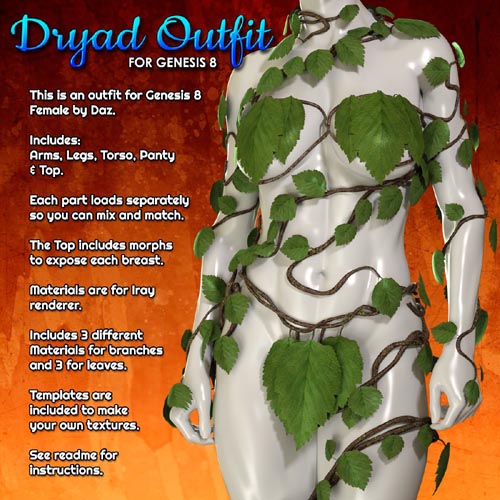
Exnem Dryad Outfit for Genesis 8 Female
Detail link: https://www.renderosity.com/marketplace/products/164080/exnem-dryad-outfit-for-genesis-8-female
This Package contains the "Dryad Outfit" meshes for Daz Studio and Iray, for use with Genesis 8 Female.
Included are:
Dryad Arm Branches
Dryad Leg Branches
Dryad Panty
Dryad Top
Dryad Torso
Each part loads separately so you can mix and match with other sets or just load the parts you want.
Included are 3 different materials for branches and 3 different materials for leaves.
The Top includes morphs to expose each breast.
The panty has dForce modifier so it conforms and drapes better over legs.
Materials are for Iray renderer.
Included are templates so you can create your own textures.
--------------------------------------
System Requirements:
DAZ Studio 4.10+
--------------------------------------
Ownership Statement:
All of this product's content was created by Exnem
--------------------------------------
Needed Files:
Genesis 8 Female
--------------------------------------
Installation Instructions:
Extract the zip-archive with your unzip program:
- Open your unzip program and press the button -Extract To-
- Select the folder with you DAZ Studio libraries (e.g.: C:\Users\Public\Documents\My DAZ 3D Library)
- Make sure that an option to extract full paths is selected to make sure you keep the right folder structures within your DAZ folder.
--------------------------------------
Usage Tips or Limitations:
To use correctly you have to follow this steps for each part:
1) Load your Genesis 8 figure (it may be already morphed if you wish)
2) Load the outfit part by double clicking while the G8 Figure is selected.
3) Simulate for the panty to adjust to your pose.
4) Apply the materials you want from the Materials folder.
Warning! You are not allowed to view this text.
DOWNLOAD:You must login to show this link. No account? Create Account Category: Renderosity
Information
Users of Guests are not allowed to comment this publication.