
Photo Props: Rain Maker
BBlK
20-Mar-24
0
Related Articles
Rain Photo Light Overlays, Rain Overlay Lights, Rain Overlay - 904799
On 24-Sep-20
by
Rain Photo Light Overlays, Rain Overlay Lights, Rain...
Rain Photo Light Overlays, Rain Overlay Lights, Rain...
Real Rain Volume, Puddles & Splashes for HDRIs
On 26-Feb-26
by
"Real Rain Volume" is a full rain system built...
"Real Rain Volume" is a full rain system built...
April Rain Gear (converted from G3F) for Genesis 8 Female(s)
On 07-Oct-21
by
April Rain Gear (converted from G3F) for Genesis 8...
April Rain Gear (converted from G3F) for Genesis 8...
Animated Rain - Waterdrop Material & FX
On 15-Aug-23
by
Animated Rain - Waterdrop Material & FX Detail link:...
Animated Rain - Waterdrop Material & FX Detail link:...
Rain Action - 16399812
On 28-Jun-16
by
Rain Action - 16399812 ATN, ABR, PAT | 4 mb...
Rain Action - 16399812 ATN, ABR, PAT | 4 mb...
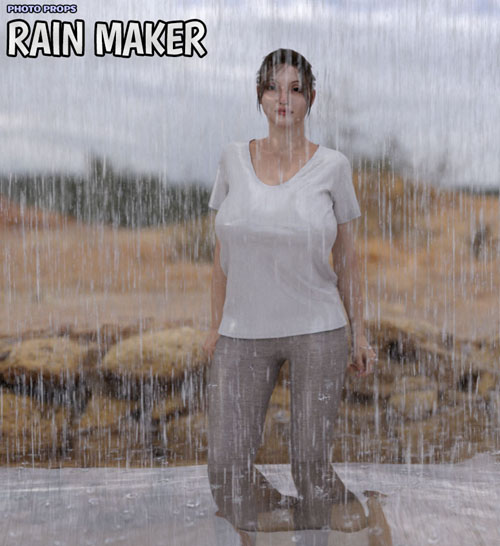
Photo Props: Rain Maker
Detail link: https://www.renderosity.com/marketplace/products/148096
Splash some rain onto your Poser and Daz Studio scenes with the Rain Maker. Rain Maker is a super simple tool for quickly adding rain to your scenes. It comes with multi-layer sheets, that grow in size for each sheet, to cover for distance. The sheets have rain textures and materials on them. There are also individual sheets if you want to place them manually.
Included is also a special "Rain Dropper" prop, similar to our Leaf Dropper scenes. It´s a simple dynamic cloth prop you drop into your scene, using Daz Studio´s DForce and Poser´s cloth room. Drop as many of these as you want onto the ground or your items, to simulate rain splashes wherever you want. No need to manually place splash props anywhere!
Some recommendations: Add wet skin shaders to your characters and props in the scene, if you don´t have this, increase specular and/or metalness a bit on the objects to give them some wet. You can also scale the multiplane props in Z axis if you want the planes closer or further apart. You can also set the texture tiles in the material if you want bigger or smaller rain drops (tiles x and y in DS and u and v scale in Poser)
The following is included:
1X, 2X, 3X and 4X rain planes
Rain dropper prop (Poser cloth or DS DForce)
6 different rain intensities for the rain planes
This product is fully compatible with both Poser and Daz Studio and comes with separate zips for each program.
Warning! You are not allowed to view this text.
DOWNLOAD
You must login to show this link. No account? Create Account Category: RenderosityInformation
Users of Guests are not allowed to comment this publication.