
[Tutorials] Shutterevolve - The Art of Digital Blending by Jimmy McIntyre
phuongdzu
09-May-15
0
Related Articles

Raya Pro 3.0 for Photoshop WIN
On 16-Jun-18
by
Raya Pro 3.0 for Photoshop WIN...
Raya Pro 3.0 for Photoshop WIN...
![[Tutorials] Creating Killer Selections - Achieve Your Vision Through Power of Local Adjustments](http://i79.fastpic.ru/big/2016/0419/2a/e2efb23f5a90f4fee98374f6ae4cc62a.jpg)
[Tutorials] Creating Killer Selections - Achieve Your Vision Through Power of Local Adjustments
On 24-May-16
by
Creating Killer Selections - Achieve Your Vision Through...
Creating Killer Selections - Achieve Your Vision Through...

Lumenzia - Luminosity Masking Panel v2.0.8 Win
On 25-Nov-16
by
Lumenzia – Luminosity Masking Panel v2.0.8 Win...
Lumenzia – Luminosity Masking Panel v2.0.8 Win...
Lumenzia 11.3.5 Win/Mac
On 22-Feb-23
by
Lumenzia 11.3.5 Win/Mac...
Lumenzia 11.3.5 Win/Mac...
![[tutorials] Photoshop Masking & Compositing: Advanced Blending](http://i.imgur.com/e5TCezH.jpg)
[tutorials] Photoshop Masking & Compositing: Advanced Blending
On 06-Sep-16
by
Photoshop Masking & Compositing: Advanced Blending...
Photoshop Masking & Compositing: Advanced Blending...
![[Tutorials] Shutterevolve - The Art of Digital Blending by Jimmy McIntyre](http://i.imgur.com/YuusIsZ.jpg)
Shutterevolve - The Art of Digital Blending by Jimmy McIntyre
DOWNLOAD
Are You Making The Most Out Of Your RAW Files?
A world-renowned course on creating beautiful photos in Photoshop
Master A Professional Photography Workflow
You will learn.
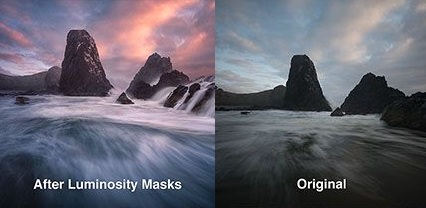
What luminosity masks are and how to create them.
How to effortlessly blend multiple exposures to create a balanced, sharp image.
How to blend between 2, 3, 4 and more exposures
How to blend long exposure images
How to create advanced selections using temporary adjustment layers
How to create targeted local contrast to make your images pop
How to intersect Alpha channels to further refine selections
How co combine 32bit HDR with luminosity mask exposure blending for powerfully natural results
How to subtract channels to make precise luminosity selections
How to use a 100% non-destructive workflow
How to intensify a sunset
How to prepare Images in Adobe Camera Raw
How to create stunning Milky Way shots
How to remove noise non-destructively
Quick and accurate selective adjustment layers
How to accurately target areas for sharpening while avoiding areas prone to noise
How to pull details out of targeted areas
How to make advanced selections based on colours
Bonus tutorial included - What masking is (For beginners to masking in Photoshop)
http://www.shutterevolve.com/luminosity-masks-tutorials-digital-blending-course/
DOWNLOAD HERE :
http://seekvn.com/file/62703dfa05cb19be889656ded196301e/Art0FDigitalBlending.part1.rar.html
http://seekvn.com/file/367be9846c06f367e6ee1bdf8a7514dd/Art0FDigitalBlending.part2.rar.html
http://seekvn.com/file/546b717e4ddf80bc51227d3dbe4fd3cb/Art0FDigitalBlending.part3.rar.html
http://seekvn.com/file/2f29f8e70dcea044941c8e22ecbeb210/Art0FDigitalBlending.part4.rar.html
http://seekvn.com/file/b141e9f904c39170490e34b37995535d/Art0FDigitalBlending.part5.rar.html

If link broken, comment under article, we will update it
Category: Photoshop
Related Articles
Raya Pro 3.0 for Photoshop WIN
On 16-Jun-18
by
Raya Pro 3.0 for Photoshop WIN...
Raya Pro 3.0 for Photoshop WIN...
[Tutorials] Creating Killer Selections - Achieve Your Vision Through Power of Local Adjustments
On 24-May-16
by
Creating Killer Selections - Achieve Your Vision Through...
Creating Killer Selections - Achieve Your Vision Through...
Lumenzia - Luminosity Masking Panel v2.0.8 Win
On 25-Nov-16
by
Lumenzia – Luminosity Masking Panel v2.0.8 Win...
Lumenzia – Luminosity Masking Panel v2.0.8 Win...
Lumenzia 11.3.5 Win/Mac
On 22-Feb-23
by
Lumenzia 11.3.5 Win/Mac...
Lumenzia 11.3.5 Win/Mac...
[tutorials] Photoshop Masking & Compositing: Advanced Blending
On 06-Sep-16
by
Photoshop Masking & Compositing: Advanced Blending...
Photoshop Masking & Compositing: Advanced Blending...
Information
Users of Guests are not allowed to comment this publication.