
Delta Force - Zoya Pomchenkova G8F
Marvel Rivals - Susan Storm AKA Invisible Woman is packed...
Clair Obscure Expedition 33 - Lune G8F Clair Obscur:...
V3D Zoya - G8F & G8.1F Detail link: V3D Zoya is a...
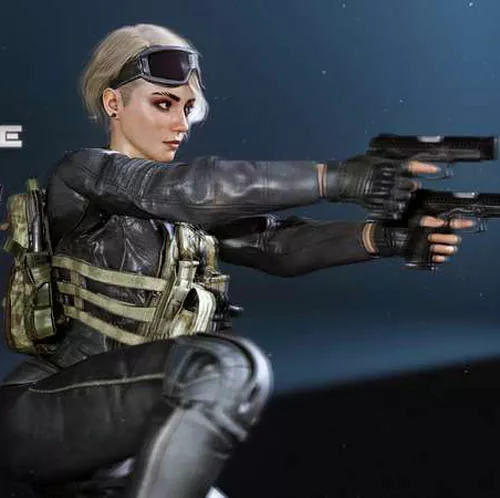
Delta Force - Zoya Pomchenkova is packed with the custom body shape morph since the G8F base was surprisingly close to her in game body shape. She also come with new skin, and eyes textures. All clothing and hair is converted to a subdivided mesh. The subdivision is not enabled automatically. You can go to the mesh resolution and increase the subdivision to gain even better functionality. You can also add a smooth modifier to your liking.
Included:
- Top
- Pants
- Boots
- Gloves
- Backpack
- Goggles
- Choker
- Tactical Vest
- Grenades
- Knee Pads
- Eyelashes
- Hair
- Hair With Mask
- Earring
Be sure to adjust rigging shape if you load in a G8F Base instead of using the "Zoya Pomchenkova Preset." It takes 20 seconds.
- Load G8F Base, apply Body and head morph, now you need to adjust the rig to fit the new shape.
- Top panels click tools drop down, select "Joint Editor."
- Right Click in the viewport next to the character.
- Then select edit and then from the drop down click adjust rigging to shape at the bottom.
- Hit accept.
- Done. Now apply hair.
There isn't any clip through on her boots but in case you still want to hide Zoya's feet so you don't get the poke through on the shoes there is a folder within Zoya's download that has a step by step process on how to do so.
The model is easily utilized in daz3d or transferred to other programs like blender. There's only so many models ripped for Delta Force content.
Detail: https://www.renderhub.com/physx-3d-assets/delta-force-zoya-pomchenkova
DOWNLOAD HERE: