
Unisex Boxer for Genesis 8 and 9
BBlK
08-Dec-25
0
Related Articles
DForce Cape Suit Outfit for Genesis 8 and 9
On 18-Jul-25
by
DForce Cape Suit Outfit for Genesis 8 and 9 Detail link:...
DForce Cape Suit Outfit for Genesis 8 and 9 Detail link:...
Boxer for Daz Dog 8
On 02-Jan-25
by
Boxer for Daz Dog 8 Detail link: Experience the charm and...
Boxer for Daz Dog 8 Detail link: Experience the charm and...
Z Unisex Standing Pose Mega Set for Genesis 9 and 8 Male and Female
On 13-Oct-25
by
Z Unisex Standing Pose Mega Set for Genesis 9 and 8 Male...
Z Unisex Standing Pose Mega Set for Genesis 9 and 8 Male...
Touchable Long Unisex
On 01-May-23
by
Touchable Long Unisex Detail link: Requirements: Long...
Touchable Long Unisex Detail link: Requirements: Long...
dForce Minimalist Unisex Outfit for Genesis 9
On 02-Jun-24
by
dForce Minimalist Unisex Outfit for Genesis 9 Detail link:...
dForce Minimalist Unisex Outfit for Genesis 9 Detail link:...
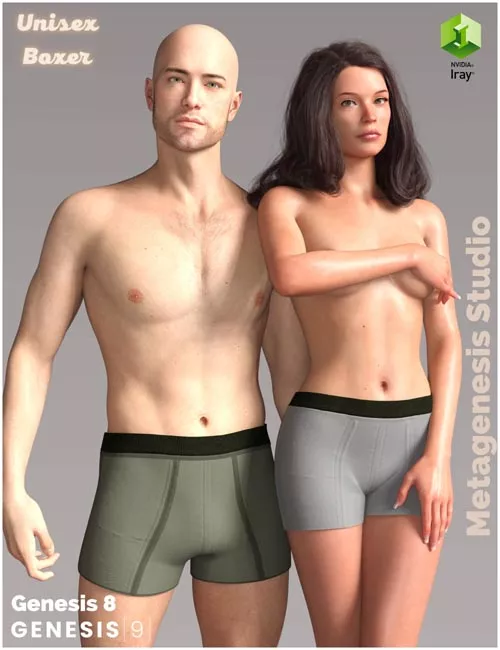
Unisex Boxer for Genesis 8 and 9
https://www.renderhub.com/metagenesis/unisex-boxer-for-genesis-8-and-9
3in1 Genesis 9 Genesis 8 Female and Genesis 8 Male
This product is DForce ready but you don't really need it. Use DForce in extreme poses.
People\Genesis 8 Female\Clothing\MGS\Unisex Boxer
People\Genesis 8 Male\Clothing\MGS\Unisex Boxer
People\Genesis 9\Clothing\MGS\Unisex Boxer
Metagenesis Studio's, Unisex Boxer for Genesis 8 and 9 is fast and fashionable for all your Genesis 8 and 9 characters.
Product Name: Unisex Boxer for Genesis 8 and 9
October 2022 by Metagenesis Studio
Thank you so much for purchasing this product! I hope you will have fun with it!
Compatible Software and Requirements:
DAZ Studio 4.21
This product has been tested in DAZ Studio 4.21 on a PC. This product was not tested on a MAC system.
This product is for DAZ Studio only.
What you get with this package:
Unisex Boxer for Genesis 8 and 9:
6 Texture Sets
3 Boxers (1x G8M, 1x G8F, 1x G9)
Instructions:(hide hair etc. for faster simulation)
1. Frame 0: Load de figure G9 zero poses, and put the clothes.
2. Frame 15: put the morphs and pose. Give 10 frames to settle.
3. You move the slider on your timeline to Frame 0 and simulate.
Remember: In some situations to prevent mesh explosions you may need to modify the pose just before it affects the garment. However, if parts of the body meet other parts or even the ground, it will need to be adjusted, leaving a small space to allow the fabric to settle.
or just simply start the simulation from memorized pose
Note: In this product, there are no figures, skin textures, hair, etc. Do not resell, no freebies. Commercial use is allowed.
Warning! You are not allowed to view this text.
DOWNLOAD
You must login to show this link. No account? Create Account Category: Other VendorsInformation
Users of Guests are not allowed to comment this publication.