
CUTOUT PAIR G8F
BBlK
19-Mar-24
0
Related Articles
dForce Doll Life G8F/G8.1F
On 28-Feb-24
by
dForce Doll Life G8F/G8.1F Detail link: dForce Doll Life...
dForce Doll Life G8F/G8.1F Detail link: dForce Doll Life...
dForce Two Pair Even Tinier Panties G8G8.1F
On 04-Feb-25
by
dForce Two Pair Even Tinier Panties G8G8.1F Detail link:...
dForce Two Pair Even Tinier Panties G8G8.1F Detail link:...
RQL-dForce Shoulder Straps Bodycon Mini Dress G8F & G8.1
On 03-Jun-25
by
RQL-dForce Shoulder Straps Bodycon Mini Dress G8F &...
RQL-dForce Shoulder Straps Bodycon Mini Dress G8F &...
Skank Set G8F
On 23-Oct-23
by
Skank Set G8F Detail link: Skank Set G8F Dress morphs ON...
Skank Set G8F Detail link: Skank Set G8F Dress morphs ON...
Rql-dForce Seductive Deep-V High-Waist Outfit for G8F &
On 28-Nov-24
by
Rql-dForce Seductive Deep-V High-Waist Outfit for G8F...
Rql-dForce Seductive Deep-V High-Waist Outfit for G8F...
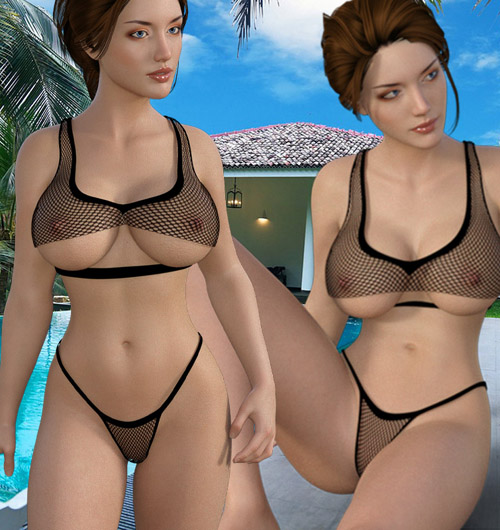
CUTOUT PAIR G8F
Detail link: https://www.renderotica.com/store/sku/62219_CUTOUT-PAIR-G8F
Sexy and revealing beach wear for Genesis 8 Female
Uses well without the dforce but for bigger breasts and more natural conforming results, option of dForce has
been enabled on the TOP.(check images for example)
Lots and lots of teasing morphs-
FIX-BREASTS MID 2
FIX-BREASTS MID
FIX-MID BREAST 3
FIX-MID BREASTS 4
FIX-MID BREASTS-NATURAL 2
crotch reveal 2
crotch reveal
left shoulder down 2
left shoulder down
panties behind down
panties behind reveal 2
panties behind reveal
panties down 2
panties down 3
panties down
panties strap left down
panties strap left out
panties strap right down
panties strap right out
pull panties down behind
right shoulder down 2
right shoulder down
sitting-P behind down
sitting-P reveal behind 2
sitting-P reveal behind 3
sitting-P reveal behind
top behind neck 2
top behind neck
top cover all
top down 2
top down
top pull down 2
top pull down
top reveal 2
top reveal left 2
top reveal left
top reveal right 2
top reveal right
top reveal
INSTRUCTIONS
Extract the zip file and copy content to Daz3d Library.
All Mats are IRAY.
For Morphs-
Top
Fix Mid Breasts Morphs to get finer and smoother result
Panties-
Lots of sitting undress morphs available.
Poke Through,
Use smoothing and collision iteration to fix poke through.
dForce TOP
For best results use
Instructions-
Use Timeline to create best dforce effects
Under Timeline TAB
Frame - 0 - default pose and default body shape
Frame -15 - desired pose and desired shape
then run dforce Simulation with below mentioned settings-
Use Animated (custom ) options-
Under Simulation Settings>
Simulation TAB>
Frame To Simulate>
(0 to 30)
Click Simulate
Hope you enjoy the new set
Cheers
Warning! You are not allowed to view this text.
Information
Users of Guests are not allowed to comment this publication.