
Engraver v0.29 for Blender
BBlK
08-Mar-24
0
Related Articles
Blendermarket – Bundle 1 Oct 2023
On 04-Oct-23
by
Blendermarket – Bundle 1 Oct 2023...
Blendermarket – Bundle 1 Oct 2023...
Realistic Engraving Effect PS Action - 5828380
On 18-Jul-21
by
Realistic Engraving Effect PS Action - 5828380 ATN PAT |...
Realistic Engraving Effect PS Action - 5828380 ATN PAT |...
Set of engraving elements frames
On 05-Jul-16
by
Set of engraving elements frames...
Set of engraving elements frames...
Engraving Sketch Photoshop Action - 7492971
On 12-Aug-22
by
Engraving Sketch Photoshop Action - 7492971...
Engraving Sketch Photoshop Action - 7492971...
Gumroad - Blender 3D AddOn: Box Cutter V7.0.5 - BetaScythe and Hard Ops 0096 - Promethium
On 27-Dec-18
by
Gumroad – Blender 3D AddOn: Box Cutter V7.0.5 – BetaScythe...
Gumroad – Blender 3D AddOn: Box Cutter V7.0.5 – BetaScythe...
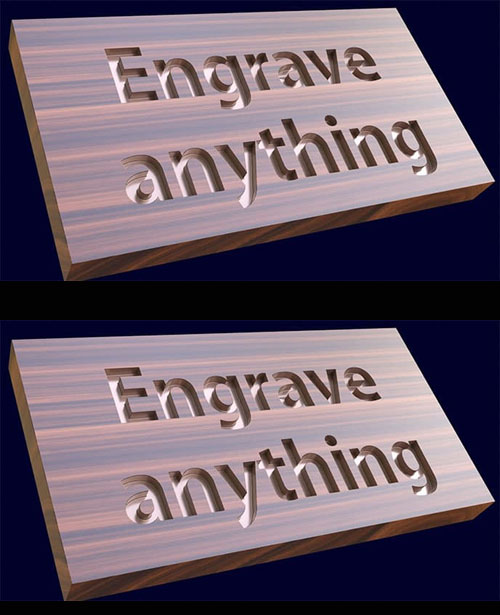
Engraver v0.29 for Blender
An engraver for Blender is a tool or add-on that allows users to create detailed engravings, etchings, or carvings on 3D models within the Blender software. This tool enables users to add intricate designs, patterns, or textures to their 3D models, enhancing their visual appeal and realism.
By utilizing various engraving techniques and parameters, users can personalize their designs and bring depth and character to their creations. This feature is particularly useful for artists, designers, and 3D modelers who want to add fine details, such as logos, text, or decorative elements, to their models, making them more unique and visually striking. Overall, an engraver for Blender provides a versatile and creative way to customize 3D designs with precision and artistry.
Features of Engraver
Engraving Techniques: The ability to implement various engraving techniques such as line engraving, stipple engraving, or relief engraving to create different visual effects.
Customizable Parameters: Options to adjust parameters such as depth, width, density, and angle to precisely control the engraving process and achieve the desired result.
Text and Shape Support: Capability to add and manipulate text, shapes, and patterns to be engraved onto 3D models.
Real-Time Preview: A feature that allows users to preview the engraving in real time, enabling them to make adjustments and see the changes immediately.
Material Interaction: Compatibility with different materials and the ability to simulate the interaction of the engraving process with the material surface.
Compatibility and Integration: Seamless integration with Blender’s interface and compatibility with various Blender versions for enhanced user experience.
User-Friendly Interface: Intuitive tools and controls that make it easy for users to create and customize engravings within the Blender environment.
https://johnniewooker.gumroad.com/l/qOyVO
Warning! You are not allowed to view this text.
DOWNLOAD
You must login to show this link. No account? Create Account Category: Other VendorsInformation
Users of Guests are not allowed to comment this publication.