
DMFX Zombie Bundle 1
BBlK
31-Dec-23
0
Related Articles
Zombie Set Pack 1
On 04-Aug-23
by
Zombie Set Pack 1 Detail link: Required Product: * For CC...
Zombie Set Pack 1 Detail link: Required Product: * For CC...
Zombie Toon Pack
On 03-May-23
by
Zombie Toon Pack Detail link: Required Product: * For CC...
Zombie Toon Pack Detail link: Required Product: * For CC...
GP Genesis 9 Zombie Masculine HD
On 26-Jun-25
by
GP Genesis 9 Zombie Masculine HD Detail link: Rising from...
GP Genesis 9 Zombie Masculine HD Detail link: Rising from...
Dealer Zombie dForce - G8F Skeleton
On 19-Feb-24
by
Dealer Zombie dForce - G8F Skeleton Detail link: Dealer...
Dealer Zombie dForce - G8F Skeleton Detail link: Dealer...
Insane Pack 01 - Game Assets + Extra
On 11-Mar-23
by
Insane Pack 01 - Game Assets + Extra Insane Pack 01 – Game...
Insane Pack 01 - Game Assets + Extra Insane Pack 01 – Game...
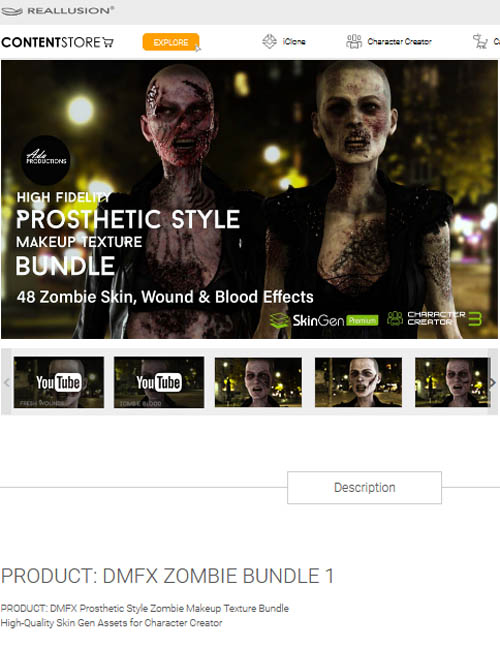
DMFX Zombie Bundle 1
Detail link: https://www.reallusion.com/ContentStore/Pack/dmfx-zombie-bundle-1
PRODUCT: DMFX ZOMBIE BUNDLE 1
PRODUCT: DMFX Prosthetic Style Zombie Makeup Texture Bundle
High-Quality Skin Gen Assets for Character Creator
This bundle includes 48 SkinGen assets of Zombie wound, skin, and blood textures from our „Zombie Pack 2 & 3“, helping you to create prosthetic “film style” makeup effects inside Character Creator 3 & 4. Special Features DMFX is powered by Reallusuion’s SkinGen Editor. This allows artists to stack DMFX prosthetic materials, and control the blend options between layers like Photoshop. This combination of our assets allows for almost limitless design possibilities through LAYER EDITING – Watch our demo. Layer Editing - You can show/hide, edit opacity levels, blend modes, layer order, merge and flatten to create subtly integrated skin texture sets. Dynamic Material Editing - Change material attributes for color, transformation, and tiling. Custom Textures - Create your own unique effects from custom masks, defining the DMFX materials range. Blend Modes for Layer Effects - Blending effects have never been easier with SkinGen’s layer stack and blend modes. These blend modes behave just like Photoshop; giving artists enhanced materials blending in real-time in the viewport. Combine wounds and skin blend modes for an array of “film style” prosthetic effects.
Warning! You are not allowed to view this text.
DOWNLOAD
You must login to show this link. No account? Create Account Category: Other VendorsInformation
Users of Guests are not allowed to comment this publication.