
ND Maisy for Genesis 8/8.1
PhuongThao85
18-Dec-23
1
Related Articles
Lampatron - Maisy LONG
On 25-Apr-23
by
Lampatron - Maisy LONG MAX | OBJ | TEX | 3D Models | 4.69...
Lampatron - Maisy LONG MAX | OBJ | TEX | 3D Models | 4.69...
ND Tanya for Genesis 8 - 8.1
On 10-Aug-24
by
ND Tanya for Genesis 8 - 8.1 Detail link: Introducing...
ND Tanya for Genesis 8 - 8.1 Detail link: Introducing...
ND Kirsty for Genesis 8-8.1 Female
On 01-Feb-25
by
ND Kirsty for Genesis 8-8.1 Female Detail link:...
ND Kirsty for Genesis 8-8.1 Female Detail link:...
ND Bg Romina for G8-8.1
On 01-Dec-24
by
ND Bg Romina for G8-8.1 Detail link: Introducing Romina, A...
ND Bg Romina for G8-8.1 Detail link: Introducing Romina, A...
ND Sonja for DAZ Genesis 8/8.1 Female
On 02-May-24
by
ND Sonja for DAZ Genesis 8/8.1 Female Detail link: ND...
ND Sonja for DAZ Genesis 8/8.1 Female Detail link: ND...
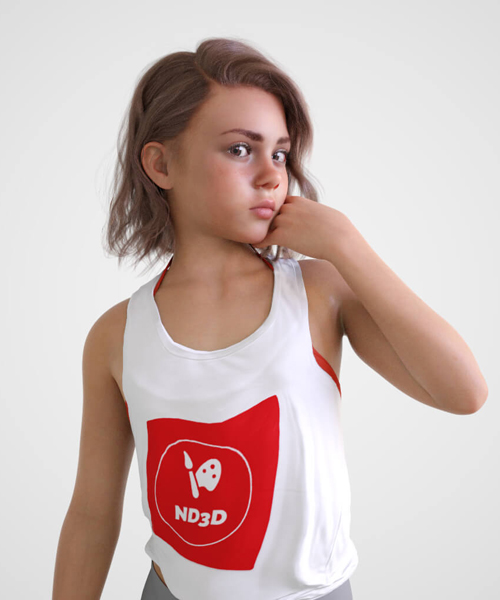
ND Maisy for Genesis 8/8.1
Detail link: https://www.renderhub.com/nd3d/nd-maisy-for-genesis-88-1
ND Maisy for Genesis 8/8.1
Introducing Maisy, a young and photogenic character that poses well and handles expressions equally so.
Copy the folders (drag and drop)
into your "My Library" folder
load up a Genesis 8/8.1 base figure and search the parameters tab for the morphs
ND Maisy Body
ND Maisy Head
ND Maisy (master slider that applies the above at 100%)
Alternatively go to your characters tab and locate Maisy
from here you can select the character !Maisy Full Shape Apply
The materials folder contains a full character material preset for IRAY ONLY!
**NOTE** you can adjust the eye shadow color,Lip tint and eye color in the surfaces tab.
Included presets are
ND Maisy Full Skin Apply
ND Maisy Brown Eyes
ND Maisy Face Texture Brows
Character folder contains the following Shaping Presets.
Maisy Body Apply
Maisy Body Remove
Maisy Head Apply
Maisy Head Remove
!Maisy Full Shape Apply
!Maisy Full Shape Remove
NOTE the full Body Apply preset will apply scaling to the Head and Body Morphs, if you wish to mix and match with other morphs please use the Maisy Full Shape remove preset first and then manual apply whichever morphs you chose.
Hair used in the promo is Haydina Hair
All promo images are using the included texture brows
most promo images are lit from no more than 3 lights and 1 simple HDRI , all are rendered in Daz Stutio with no post work
Warning! You are not allowed to view this text.
DOWNLOAD
You must login to show this link. No account? Create Account Category: Other VendorsComments (1)
Information
Users of Guests are not allowed to comment this publication.