
3DMotive - Intro to Keyshot 7
cod2war
05-Jan-19
0
Related Articles

Luxion KeyShot 9 Plugin for NX V1.3 Win
On 23-Nov-19
by
Luxion KeyShot 9 Plugin for NX V1.3 Win...
Luxion KeyShot 9 Plugin for NX V1.3 Win...
![[Tutorials] Udemy - Model and Present a 3d Drone using Maya and Keyshot](http://i.imgur.com/22oAgrc.jpg)
[Tutorials] Udemy - Model and Present a 3d Drone using Maya and Keyshot
On 13-Aug-15
by
Udemy - Model and Present a 3d Drone using Maya and...
Udemy - Model and Present a 3d Drone using Maya and...
![[Plugins] Luxion KeyShot PRO 6.1.72 Win/Mac](http://i.imgur.com/oxzVyLR.jpg)
[Plugins] Luxion KeyShot PRO 6.1.72 Win/Mac
On 15-Feb-16
by
Luxion KeyShot PRO 6.1.72 Win/Mac...
Luxion KeyShot PRO 6.1.72 Win/Mac...
![[Tutorials] Digital-Tutors - Product Design Pipeline: Rendering a Watch in KeyShot](http://i57.fastpic.ru/big/2015/0403/20/cc35bf3e1f37ba30f78aec1e441ec620.jpg)
[Tutorials] Digital-Tutors - Product Design Pipeline: Rendering a Watch in KeyShot
On 15-Apr-15
by
Digital-Tutors - Product Design Pipeline: Rendering a...
Digital-Tutors - Product Design Pipeline: Rendering a...
Luxion KeyShot Pro 12.1.1.3 Win x64
On 18-Jul-23
by
Luxion KeyShot Pro 12.1.1.3 Win x64...
Luxion KeyShot Pro 12.1.1.3 Win x64...

3DMotive – Intro to Keyshot 7
Duration 1h 18m Project Files Included MP4
DOWNLOAD
Info:
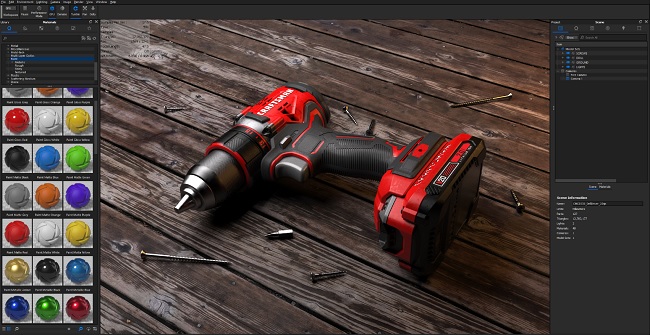
Intro to Keyshot 7 is the rendering course for you! There are a number of programs that can simulate realistic renders but Keyshot is the most direct, user-friendly program on the market today. From the first Welcome screen, you can easily link directly to Keyshot’s online tutorials, manuals and forum as well as view their content across a variety of social media programs. You can set up custom hotkeys or even switch Keyshot’s controls to match a 3D software of your choice for better functionality familiarity. Keyshot is designed to easily manipulate your model and allow you to control individual parts as you see fit. You can even create and modify 3D primitives within the Keyshot viewport and then move, scale, rotate or delete as necessary. A multitude of materials are found within Keyshot’s library that can assist you in easily dragging/dropping materials onto your mesh, even without texture UV coordinates, to make your model look more realistic. Everything within Keyshot is customizable, including the parameters of each material, backplate (background image), and environment. Within minutes you can render out photo-quality screenshots, from low to production-grade resolution, using a combination of tools within Keyshot.
DOWNLOAD HERE :
https://seekvn.com/file/54c633661d85be6b00b455200bd5ced3/3DMIntrotoKeyshot7.part1.rar.html
https://seekvn.com/file/5bc91d0d958e0d2dfb5ce2a08f711e3d/3DMIntrotoKeyshot7.part2.rar.html
https://seekvn.com/file/52ab31a8829b32008058ddcef4ad6cda/3DMIntrotoKeyshot7.part3.rar.html
https://seekvn.com/file/52846e681f7855d1ae3c8a7d34c45db6/3DMIntrotoKeyshot7.part4.rar.html
https://seekvn.com/file/db11e311c24e2d2951a2aa9d8c3a25f2/3DMIntrotoKeyshot7.part5.rar.html
https://seekvn.com/file/49dc059bcb809635e7ed6cb9a0016f3b/3DMIntrotoKeyshot7.part6.rar.html

If link broken, comment under article, we will update it
Category: Other 3D
Information
Users of Guests are not allowed to comment this publication.