
Measure Metrics for DAZ Studio [New Update']

Admin 10-Jul-16 11
Related Articles
Measure Metrics Latest For DAZ Studio [Updated]
On 18-Jan-26 by
Have you ever loaded a figure into Daz Studio and thought...
UPDATED Measure Metrics Latest For DAZ Studio 4.23
On 24-Mar-25 by
UPDATED Measure Metrics Latest For DAZ Studio 4.23 UPDATED...

Haerin 9 Athletic Curves Shape Add-On
On 27-Dec-25 by
Mix up Haerin's look with the Athletic Curves shape...

Jaewon 9 Athletic HD Shape Add-On
On 20-Dec-25 by
Jaewon 9 Athletic HD gives Jaewon a new look with more...

Julian 9
On 02-Jan-26 by
Hit the gym or embrace the call of the outdoors with...

Have you ever loaded a figure into Daz Studio and thought to yourself, "I wish there was an easy way to get accurate measurements?"

Have you wanted a way to adjust your figure's proportions and see the measurements in real time?

Now you can!

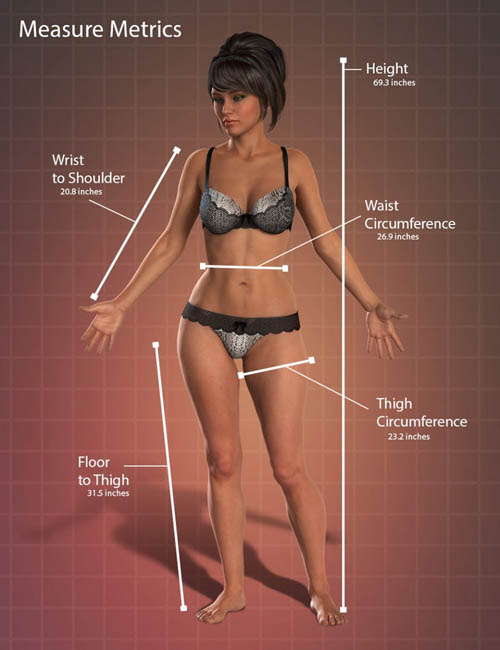
The Measure Metrics plug-in will allow you to measure the length, diameter or angle of figures and props in your scene. It uses both Metric and US inches/feet. By using the Tape Measure, Tailor's Tape or the Protractor, you can remove the "guesswork" from your artwork.

Measure Metrics comes with "Pre-set" nodes to help you measure the dimensions of your favorite figures. It also allows you to set up your own nodes to measure any kind of object, or even empty space between figures, within your scene.

A script included with Measure Metrics allows you to configure morphs which control the dimensions of your figure, allowing you to set the dimensions and have the script automatically adjust the morphs to match the dimensions entered.

Measure your figure's or prop's dimensions or configure the tool to automatically set your figure to dimensions that you specify without having to adjust dozens of morph sliders.This is a fun and powerful tool!

Updated 2017-8-22 Added support for Genesis 8 Male

Detail link: https://docs.daz3d.com/public/read_me/index/16684/start

DOWNLOAD HERE
DOWNLOAD:You must login to show this link. No account? Create Account Category: Daz3D
Comments (11)
  1. On 25 January 2015 04:12 fuzzy70 said:
    It's still the Daz Studio 4.6 Version & won't install in current 4.7 belay
    Complaint
  2. On 25 January 2015 12:58 MethozS402 said:
    does anyone successfully install this??
    Complaint
  3. On 3 April 2015 22:11 Mariandr said:
    Quote: MethozS402
    does anyone successfully install this??

    1.Install studio 4.6 to C:\Program Files\DAZ 3D\DAZStudio4\
    2.Install Measure Metrics for DAZ Studio
    3.dzmeasuremetrics.dll -> to your plugins(studio 4.7)
    4.IM00016684-20_FigureMetrics.zip -> to proper dir(studio 4.7)
    5.uninstall studio 4.6
    make beauty... nice and diverse
    Complaint
  4. On 4 July 2015 05:03 Whitelightning said:
    Quote: Mariandr
    Quote: MethozS402
    does anyone successfully install this??

    1.Install studio 4.6 to C:\Program Files\DAZ 3D\DAZStudio4\
    2.Install Measure Metrics for DAZ Studio
    3.dzmeasuremetrics.dll -> to your plugins(studio 4.7)
    4.IM00016684-20_FigureMetrics.zip -> to proper dir(studio 4.7)
    5.uninstall studio 4.6
    make beauty... nice and diverse


    Where can I find and download studio 4.6?
    Complaint
  5. On 10 July 2016 15:45 Dimer said:
    Update to App Data file folder missing. Whilst it is fine on G2F, Figure metrics edit not working on G3F G3M belay
    Complaint
  6. On 11 July 2016 06:53 guptatsg said:
    Unable to install in DAZ4.6, Where is dzmeasuremetris.dll ??? not found in zip folder. thanks
    Complaint
  7. On 12 July 2016 11:26 MissThao said:
    Update
    Complaint
  8. On 13 August 2016 03:09 mylala said:
    Just impossible to install on Mac OS
    Complaint
  9. On 30 September 2016 19:53 Kr0zBoNE said:
    Thank you very much
    Complaint
  10. On 2 January 2018 06:04 hoshi23 said:
    first of all may i say thanks for sharing. sadly it does not seem to work with ds 4.10, because it says plugin failed to load. the necessary files all seem to be there. also it looks like it needs to be registered. ;)
    Complaint
  11. On 12 April 2019 06:16 Convoyer said:
    Garbage. Don't waste time on it, it doesn't work.
    Complaint
Information
Users of Guests are not allowed to comment this publication.
