
Daz Studio 4 Scene Tools 4 - Morph Tools
BBlK
29-Nov-25
0
Related Articles
Morph Master
On 12-Jan-25
by
Morph Master Detail link: Have you ever wished you could...
Morph Master Detail link: Have you ever wished you could...
Fitness Body Morph for Genesis 8/8.1 Female
On 19-Mar-25
by
Fitness Body Morph for Genesis 8/8.1 Female Detail link:...
Fitness Body Morph for Genesis 8/8.1 Female Detail link:...
Sim Ki - Teen Character Morph for Genesis 9
On 17-Mar-24
by
Sim Ki - Teen Character Morph for Genesis 9 Detail link:...
Sim Ki - Teen Character Morph for Genesis 9 Detail link:...
Cheena Balandra - Filipino Character Morph for G8.1F
On 10-Apr-24
by
Cheena Balandra - Filipino Character Morph for G8.1F...
Cheena Balandra - Filipino Character Morph for G8.1F...
Yu Ming - Asian Teen Morph for Genesis 9
On 07-Mar-25
by
Yu Ming - Asian Teen Morph for Genesis 9 Detail link: Yu...
Yu Ming - Asian Teen Morph for Genesis 9 Detail link: Yu...
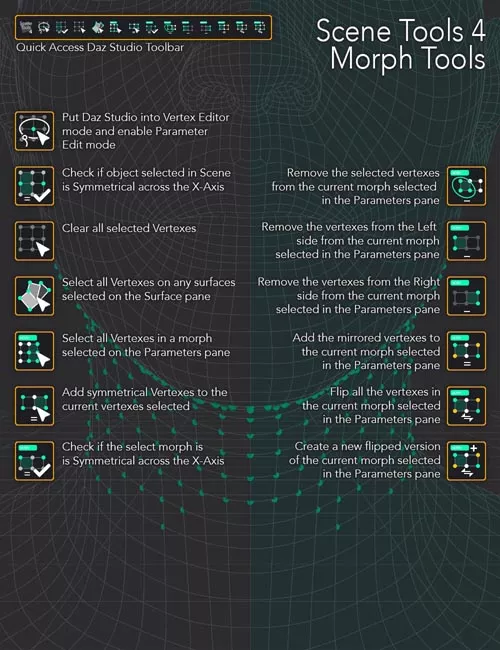
Daz Studio 4 Scene Tools 4 - Morph Tools
Detail link: https://www.daz3d.com/daz-studio-4-scene-tools-4--morph-tools
Take full control of your morph creation workflow with the Daz Studio 4 Scene Tools 4, a streamlined set of powerful DAZ Studio scripts designed specifically for morph artists, PAs, and advanced content creators. These tools are built to make the process of customizing morphs quick and easy, instead of a multi-step and intricate process.
Whether you're refining facial expressions, clothing adjustments, or full character morphs, this collection of utilities gives you precision and speed at your fingertips.
With a quick click on the custom toolbar, you can:
Instantly switch to the perfect morph editing environment (Hidden Line style, Geometry Editor + Lasso, and morphs in edit mode)
Analyze geometry with symmetry checks for both objects and morphs
Quickly select vertices by surface, by morph influence, or symmetrical counterparts
Clean, clear, or remove deltas from morphs with fine-grained control (all, left, right, or selected)
Ensure your morphs are professional grade with symmetry validation and correction tools
Automatically generate flipped or mirrored morphs for faster content creation
Whether you need to correct asymmetries, fine-tune details, or build mirrored variations, the Daz Studio 4 Scene Tools 4 makes morph editing more efficient, consistent, and intuitive.
Perfect for:
Character and clothing morph creators
Content developers seeking precision and automation
Anyone wanting to streamline repetitive morph editing tasks
Save time. Gain accuracy. Build better morphs.
Warning! You are not allowed to view this text.
DOWNLOAD
You must login to show this link. No account? Create Account Category: Daz3DInformation
Users of Guests are not allowed to comment this publication.