
LI Lively Hair for Genesis 9
BBlK
22-Sep-24
0
Related Articles
LI Short-Stop Hair for Genesis 9
On 09-Jun-24
by
LI Short-Stop Hair for Genesis 9 Detail link: Introducing...
LI Short-Stop Hair for Genesis 9 Detail link: Introducing...
SFD Dual Lobe Hair Shaders, Brows and Lashes Presets for Genesis 9
On 12-Dec-25
by
21 different Dual Lobe Hair Shader Presets for Strand...
21 different Dual Lobe Hair Shader Presets for Strand...
dForce Louis Hair for Genesis 9
On 07-Jan-26
by
dForce Louis Hair is a morphing dForce strand based model...
dForce Louis Hair is a morphing dForce strand based model...
dForce Lanah Hair for Genesis 9
On 07-Nov-24
by
dForce Lanah Hair for Genesis 9 Detail link: dForce Lanah...
dForce Lanah Hair for Genesis 9 Detail link: dForce Lanah...
dForce Juneau Hair for Genesis 9
On 23-Aug-24
by
dForce Juneau Hair for Genesis 9 Detail link: dForce...
dForce Juneau Hair for Genesis 9 Detail link: dForce...
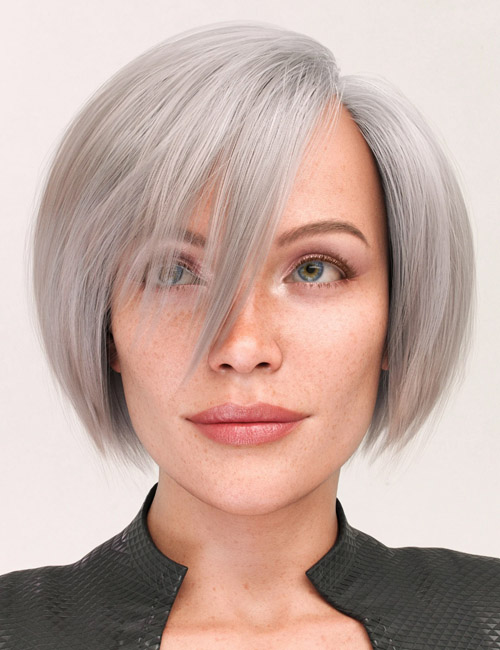
LI Lively Hair for Genesis 9
Detail link: https://www.daz3d.com/li-lively-hair-for-genesis-9
Laticis Imagery presents the Lively Hair for Genesis 9.
This product offers an array of tools to help you create a short bob hair styles with a vast amount of morphs and textures presets. To help you customize just the right look, assorted hair card opacity maps are included.
There are two different shader options provided.
Option 1 is the standard Iray Uber Shader and Option 2 is the Iray Blended Dual Lobe Shader. Either one will give you a great foundation to build just the right material for your character and scene.
The skull cap is fitted to Genesis 9, the hair is fitted to the Skull Cap which also has assorted morphs to help the cap move and slide over Genesis head thus affecting hair placement.
The main hair has also been broken down to its two main components, the strands and the flyaway's which all share the same morphs. This way, you can combine the elements and dial in subtle morph variations to add layers of details.
The hierarchal material presets and material building tools presets have been built with the six items. Cap, Hair, Strands, Flyaways, Bang Left and Bang Right but there's no reason why you can't just add more hair layers to build upon this foundation. It will just take a little manual work :)
The Color ID presets also offer a great place to start building some complex material set ups.
Happy rendering.
Warning! You are not allowed to view this text.
DOWNLOAD
You must login to show this link. No account? Create Account Category: Daz3DInformation
Users of Guests are not allowed to comment this publication.