
LowPi PathTool Extension
LowPi Area and Slope extension adds even more useful...
LowPi Crowd Generator Plus extension will take your LowPi...
Population System PRO unity | 3D Models | 111.15 MB...
Path Painter UNITY | 3D MODELS | 28.7 MB ========== Path,...
The Mystic Path Detail link: Details Does your garden/park...
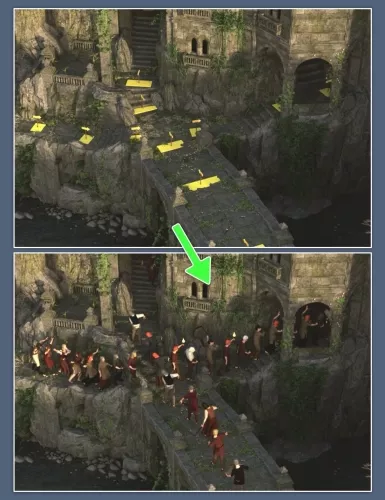
The PathTool Extension is a powerful addition to the LP Crowd Generator, enabling precise and dynamic placement of LowPi figures along custom paths. With this tool, you can quickly create realistic crowd flows, marching lines, or scenic background characters that follow a defined trajectory.
Path Creation with LP Path Markers
Paths are constructed by placing a sequence of LP Path Markers in the scene. These markers define the curve or direction the LowPis will follow. The more markers used, the more refined and flexible the path becomes, supporting both straight and curved routes. Paths can also vary in elevation, enabling natural movement along terrain or ramps.
Population Modes
The extension supports three main population modes, determining where along the path the LowPis are placed:
- Full - Populates the entire length of the path with LowPis.
- Head - Concentrates the LowPis toward the beginning of the path.
- Tail - Places the LowPis toward the end of the path.
These options allow for both fully filled crowds and dynamic formations like incoming or dispersing groups.
Population Types
To further refine crowd density and behavior, the PathTool provides several population types, which control how LowPis are spaced:
- Sparse - LowPis are loosely spaced, ideal for casual movement or distant background figures.
- Condensed - Tight spacing between LowPis, suitable for dense marches, parades, or crowds.
- Increase - Spacing starts tight and gradually increases along the path, giving a sense of acceleration or dispersal.
- Decrease - Begins with wide spacing and becomes tighter toward the end, simulating gatherings or converging movement.
By combining different population modes and types, you can craft a wide variety of crowd dynamics that match the tone and layout of your scene.
To help you adjust the LP Path Markers, there are two scripts, LP Show Path Rays and LP Remove Path Rays. With a ray attached to the LP Path Marker, you can easily see if the 'virtual ray' will hit the next marker or not.
Don't miss out, add LowPi PathTool Extension to your LowPi Crowd Generation toolbox today to be able to easily create more realistic background LowPis on the move.